Best Conference Speakerphones for Business in 2026
A good speakerphone makes everyone at the table sound like they are in the room. Here are the pucks worth buying, from home office to conference room.
The best conference speakerphone for most people is the Jabra Speak2 55 — it pairs strong full-duplex audio with a noise-cancelling mic array, works over USB or Bluetooth, and comes in Teams- and Zoom-certified versions. For a small conference room, step up to the Jabra Speak2 75 or a pairable Poly Sync 40. On a tight budget, the Anker PowerConf S3 covers a home office for far less.
This guide ranks the conference speakerphones worth buying in 2026, by use case: home office, small conference room, travel, and budget. We focus on what actually changes a call — mic pickup radius, full-duplex audio (both sides can talk at once), platform certification, and how the device connects. We also cover when a speakerphone stops being enough and a conference room microphone system takes over.
Run Your AI On Mac Studio

The ultimate machine for running AI models on your own desk: M5 Max, a 32-core GPU, and 36GB of unified memory.
The Best Conference Speakerphones, Ranked

The Speak2 55 is the default pick for daily calls from a desk. Four beamforming mics with noise cancellation keep your voice clear, full-duplex audio stops the walkie-talkie effect, and it connects over USB, Bluetooth, or the optional Link 380 dongle. Teams- and UC-certified versions are available.
View on Amazon →- 4-mic beamforming array with noise cancellation
- Full-duplex audio
- USB, Bluetooth, or Jabra Link 380 dongle
- Teams / UC certified variants
- Excellent mic clarity for the size
- Works wired or wireless
- Light enough to travel
- Speaker is sized for 1–4 people, not a room
- Dongle sold with specific bundles only
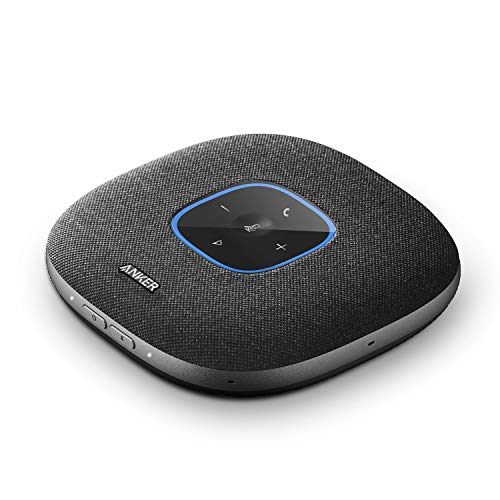
The PowerConf S3 delivers a six-mic array, echo cancellation, and long battery life at a fraction of the enterprise brands' price. It is not platform-certified, but for a home office or a small huddle desk it covers the basics well and connects over Bluetooth or USB-C.
View on Amazon →- 6-microphone array with echo cancellation
- Bluetooth + USB-C
- Long battery life for all-day calls
- Best for 1–4 people
- Very strong price-to-performance
- Good battery
- Simple setup
- No Teams/Zoom certification
- Software features are basic

The Sync 40 is built for shared rooms: a bigger speaker, multi-mic steering, and USB or Bluetooth connection. Its standout trick is pairing — two Sync 40 units can be linked to cover a longer table, which delays the jump to an installed room system.
View on Amazon →- Multi-microphone array with noise reduction
- Two units can be paired for larger tables
- USB-A/USB-C + Bluetooth
- Teams / Zoom certified variants
- Room-grade speaker volume
- Pairable for bigger tables
- Rugged, portable build
- Bulkier than desk pucks
- Premium price for the category

The Speak2 75 is the Speak2 55's bigger sibling: a larger speaker, four noise-cancelling mics, and voice-level normalization that evens out loud and quiet talkers. It is the strongest single-puck option for a small meeting room, and certified versions cover Teams, Zoom, and Google Meet.
View on Amazon →- Large full-range speaker
- 4 noise-cancelling mics + voice normalization
- USB, Bluetooth, or Link 380 dongle
- Certified for major meeting platforms
- Best audio quality in a portable puck
- Evens out quiet talkers
- Doubles as a music speaker
- Premium price for the category
- Overkill for solo desk calls
EPOS (the former Sennheiser business audio line) tunes the Expand 40 for voice above all. It ships with a wired USB connection and a Bluetooth option via the BTD 800 dongle, and the Expand 40T variant carries full Microsoft Teams certification with a dedicated Teams button.
View on Amazon →- Beamforming mic array tuned for speech
- USB-C wired + Bluetooth via BTD 800 dongle
- Expand 40T: Teams-certified with Teams button
- Best for small-to-mid rooms
- Very natural voice reproduction
- Reliable dongle connection
- Solid build quality
- Less consumer-friendly setup
- Fewer retail bundles than Jabra

The Luna is the cheapest way to stop using a laptop mic. Voice-activated noise reduction, USB and Bluetooth connections, and a daisy-chain mode that links two Luna units for a longer table. Audio quality trails the picks above, but the price makes it easy to put one in every huddle space.
View on Amazon →- Noise reduction with voice activation
- USB + Bluetooth + optional dongle
- Two units can be daisy-chained
- Best for 1–4 people on a budget
- Very affordable
- Daisy-chain option at a budget price
- Compact
- Mic pickup weaker at distance
- No platform certification
Conference speakerphones at a glance
| Speakerphone | Best for | Connection | Room size |
|---|---|---|---|
| Jabra Speak2 55 | Home office | USB / Bluetooth / dongle | 1–4 people |
| Anker PowerConf S3 | Value pick | USB-C / Bluetooth | 1–4 people |
| Poly Sync 40 | Small conference room | USB / Bluetooth, pairable | 4–8 people |
| Jabra Speak2 75 | Premium small room | USB / Bluetooth / dongle | 2–6 people |
| EPOS Expand 40 | Teams-first rooms | USB-C / BTD 800 dongle | 3–8 people |
| eMeet Luna | Budget | USB / Bluetooth, chainable | 1–4 people |
How to Choose a Conference Speakerphone
Start with two questions: how many people sit around the device, and what does it plug into? Those answers decide the mic pickup radius you need and whether USB, Bluetooth, or a dongle is the right connection.
- Pickup radius — Desk pucks hear people clearly within a few feet. For a table of six or more, you need a room-class unit (Poly Sync 40, Speak2 75) or two paired units.
- USB vs Bluetooth vs dongle — USB is the most reliable. A dedicated dongle (Jabra Link 380, EPOS BTD 800) is nearly as good. Native laptop Bluetooth is the weakest link: when the mic is active, many laptops drop to a low-quality hands-free codec, so your audio degrades exactly when the call starts.
- Platform certification — Teams- and Zoom-certified variants are tested end to end, and certification often gates real features: the dedicated Teams button, LED call status, and platform-tuned firmware only ship on the certified SKU.
- Daisy-chaining — Some models (Poly Sync 40, eMeet Luna) link two units to cover a longer table. The practical limit is two; past that, move to a room microphone system.
- Battery — If the device roams between rooms, check talk-time. Wired desk use makes battery irrelevant.
Speakerphone vs Conference Room Microphone System
A speakerphone is a single self-contained puck: mics, speaker, and processing in one box you can move between rooms. A conference room microphone system is installed gear — ceiling or table mic arrays wired into a room processor or video bar — that covers the whole space evenly.
The crossover point is roughly eight to ten seats. Below that, one or two good pucks cover the table for a fraction of the cost. Above it, people at the far end start sounding distant no matter how good the puck is, and an installed mic array (or a video bar with expansion mics) wins. Rooms with hard walls and glass also favor installed systems, because ceiling arrays handle echo better than a table puck can.
Frequently Asked Questions
- The Poly Sync 40 is the best speakerphone for a small conference room — its speaker and mic array are sized for a table of four to eight, and you can pair two units to stretch coverage. The Jabra Speak2 75 is the strongest single-puck alternative, with voice normalization that balances loud and quiet talkers.
- Yes. Every speakerphone in this guide works with Microsoft Teams, Zoom, and Google Meet as a standard audio device. For the best experience, buy the certified variant for your platform — certified models are tested end to end and often add a dedicated Teams button and call-status LEDs. Also prefer USB or the vendor dongle over native laptop Bluetooth, which can reduce mic quality mid-call.
- Yes, and it is usually the single biggest audio upgrade you can make. Laptop mics sit next to the fan and keyboard and point sideways at you. A speakerphone puts a multi-mic beamforming array pointed at the talkers, adds echo cancellation, and supports full-duplex audio so both sides can speak at once without cutting out.
- Some models support it. The Poly Sync 40 and eMeet Luna can each link two units to cover a longer table, which roughly doubles mic reach. Two units is the practical ceiling for pucks — if a room needs more than that, an installed conference room microphone system or a video bar with expansion mics is the better spend.
Upgrading your meeting audio?
Layer3 Labs helps small and mid-size businesses choose and deploy meeting-room gear — speakerphones, cameras, and AI note-taking — so hybrid calls just work. We map the right devices to your rooms, platforms, and budget.
Book a free consultation