EMEET C950 4K Webcam for PC Review: A Personal Conference Camera
Fast phase detection autofocus and a narrow 70-degree field of view make this compact unit sharp for individual desks but unusable for group meeting tables.
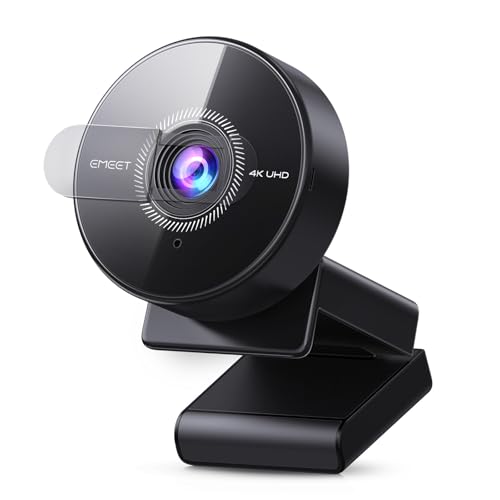
Buy the EMEET C950 4K Webcam for PC if you need sharp personal video and background privacy for solo desk calls. Skip it entirely if you are shopping for a group conference room, because the fixed bracket and tight lens cannot capture a meeting table.
Check price on Amazon →The EMEET C950 4K Webcam for PC is a capable desktop video camera for solo office workers, but it is not a genuine group conference camera despite its Amazon category ranking. It delivers crisp 4K resolution at 30 frames per second (FPS), rapid Phase Detection Autofocus (PDAF), and a tight 70-degree Field of View (FOV) that crops out cluttered office backgrounds. For an individual employee taking daily video meetings on Zoom or Microsoft Teams, that combination provides clean video without complicated software setup.
The confusion comes from the conference camera category label. Outfitting a shared meeting space requires hardware that captures multiple people across a table, whereas the EMEET C950 lacks tripod threads, pan-tilt motors, and long-range microphone arrays. This review examines the actual hardware specifications, outlines which workstations benefit from the tight lens, and compares the unit against competing options on the current sales shelf.
What the EMEET C950 Offers and Who Should Buy It
The EMEET C950 4K Webcam for PC serves single-user workstations where sharp video clarity and background isolation take priority over wide-angle room coverage. It houses an 8-megapixel Complementary Metal-Oxide Semiconductor (CMOS) sensor that produces 3840 by 2160 video at 30 FPS, alongside a 1080P mode running at 60 FPS for smoother motion. The integrated clamp fits laptop lids and desktop monitors. Remote employees can upgrade built-in laptop cameras without installing third-party system drivers. Installation takes seconds over a standard Universal Serial Bus (USB) port.
Buyers outfitting shared corporate spaces should bypass this unit in favor of dedicated meeting room systems. Because the camera uses a fixed 70-degree FOV and an audio pickup limited to 6 feet, placing it at the head of a conference table leaves half the participants off-screen and unheard. It lacks Artificial Intelligence (AI) auto-framing, active speaker tracking, and motorized Pan-Tilt-Zoom (PTZ) controls. If you manage hybrid meeting rooms with three or more in-person seats, invest in an enterprise room bar instead of a personal desktop webcam. Solo professionals, remote sales representatives, and home office workers will find the personal framing ideal, but group spaces require entirely different hardware.
- Best for: Individual remote employees, customer-facing sales desks, and private office video calls
- Also good for: Online educators and live streamers who need 1080P at 60 FPS with rapid autofocus
- Skip it if: You need to capture a multi-person conference room, mount hardware to a tripod, or track moving speakers across a room
Standardizing on conference cameras across your team? At Layer3Labs, we help small and mid-size businesses pick and roll out the right AI-ready hardware for their workflows.
Book a ConsultationVisual Clarity, Sensor Performance, and Frame Rates
The 8-megapixel CMOS sensor in the EMEET C950 delivers crisp 4K video at 30 FPS under adequate office lighting while maintaining backwards compatibility with 1080P streams at 60 FPS. Under natural or controlled room lighting, the 4K Ultra High Definition (UHD) image provides clean edges and sharp facial detail for client presentations and high-stakes calls. When video conferencing services such as Zoom, Microsoft Teams, Google Meet, or Cisco Webex compress incoming streams to 1080P, the higher native sensor resolution helps preserve sharpness through hardware downsampling. If your workflow involves motion-heavy tasks like software training or physical product demonstrations, switching the camera output to 1080P at 60 FPS produces fluid movement without motion blur.
The CMOS sensor provides hardware-level low-light compensation, but video output remains sensitive to room lighting and the specific software application in use. Resolution ceilings often depend on your software configuration, as apps like PotPlayer, Open Broadcaster Software (OBS), FaceTime, and browser-based meeting utilities apply different bandwidth and rendering caps. For the sharpest results, users must configure their application video settings manually and maintain consistent front-facing desk lighting, as dim workspaces introduce digital noise into the darker areas of the image. The camera produces its cleanest picture when paired with a basic desk lamp or natural window light directly in front of the screen.
Phase Detection Autofocus and the 70-Degree Lens
Phase Detection Autofocus gives the EMEET C950 rapid focus adjustments between 4 inches and 10 feet, outperforming standard contrast-detection webcam lenses in speed and stability. Traditional webcams rely on contrast-detection algorithms that hunt forward and backward before locking onto a subject, creating an annoying pulsing effect on video calls. By utilizing PDAF technology, the EMEET C950 calculates subject distance instantaneously, allowing you to hold documents or physical objects 4 inches from the glass without losing sharpness. This mechanism keeps you in sharp relief as you lean, stand, or shift in your office chair.
The optical assembly pairs that autofocus system with a tight 70-degree FOV, which acts as a physical barrier against background visual distractions. While typical conference cameras feature 90-degree to 120-degree wide angles to capture entire rooms, this narrow cone isolates your head and shoulders. Colleagues in open-plan offices, walking family members, and home clutter stay outside the frame. This narrow cone provides solo professionals with clean visual presentation without artificial digital background blurring. Users can adjust fine image parameters such as brightness and contrast, and upgrade device firmware through the downloadable EMEETLINK software utility on compatible computers.
That narrow 70-degree optic is a double-edged sword for business buyers. For individual desks, it eliminates the fisheye distortion common on cheap wide-angle lenses and keeps the meeting focused strictly on the speaker. In collaborative group settings, however, the narrow field of view cuts off anyone sitting outside the center of the desk. This forces colleagues to squeeze tightly together to appear on camera.
Microphone Reach, Bracket Adjustments, and Privacy Hardware
The physical architecture of the EMEET C950 emphasizes desk security and quick deployment through a driver-free USB 2.0 interface and an integrated privacy shutter. An integrated omnidirectional microphone captures voice audio reliably up to 6 feet away, making it suitable for private offices and quiet home workstations. The single-element pickup handles standard conversation clearly, but it lacks multi-microphone beamforming arrays, active acoustic echo cancellation, and directional noise suppression found in high-end conference hardware. In noisy open offices or echoing conference rooms, ambient chatter and keyboard clatter bleed into the audio channel, requiring users to sit within arm's reach of the monitor.
Physical positioning relies on a multi-angle monitor bracket that tilts 15 degrees forward and 90 degrees backward, accommodating various screen heights and low-angle desktop work. Connectivity is completely plug-and-play over USB 2.0 via standard USB Video Device Class (UVC) protocols across Windows 10, Windows 11, macOS 10.14 or later, and Android TV V7.0 or later. Setup requires no administrative software privileges, allowing enterprise staff to plug the device directly into locked-down corporate laptops without help desk tickets.
For privacy-conscious organizations, the unit features a built-in physical lens cover and contains zero Wi-Fi, Bluetooth, local memory, or cloud storage capabilities. Closing the physical shutter blocks the optical sensor entirely. This gives employees visual confirmation that video capture is disabled when calls conclude. Because the hardware processes all data locally through the wired USB bus without wireless radios, security teams face no concerns regarding unauthorized wireless pairing or unvetted cloud synchronization pipelines.
Where the EMEET C950 Falls Short for Businesses
The EMEET C950 lacks the mounting flexibility, optical width, and group audio processing necessary to operate as a true business conference room camera. The most critical mechanical limitation is that tripod mounting is not supported. Because there is no standard 1/4-inch threaded screw mount on the base, you cannot attach the camera to a tabletop tripod, floor stand, or articulated desk arm. You are forced to rest the bracket directly on a computer monitor or a flat table edge, severely restricting camera placement in collaborative spaces. If a conference table sits more than six feet from the wall monitor, the camera cannot be repositioned closer to meeting participants.
Furthermore, the product contains no AI auto-framing, optical zoom, or motorized PTZ hardware to adjust for multiple seated attendees. What would change our answer is if EMEET added a standard tripod thread, a wider 90-degree field of view, and dual beamforming microphones with acoustic noise filtering. Until those elements exist on this chassis, businesses should treat this model strictly as a high-resolution solo workstation peripheral rather than a room-scale collaboration system. Buying this camera expecting it to serve a four-person huddle room will lead directly to poor meeting experiences.
- No tripod mounting support, preventing flexible placement on tripods, stands, or boom arms
- Tight 70-degree FOV cuts off adjacent seats when used at shared meeting tables
- Single omnidirectional microphone limits effective vocal pickup to 6 feet
- Absence of AI auto-framing, speaker tracking, and motorized pan-tilt adjustments
- No wireless connectivity or internal memory, requiring a direct wired USB 2.0 connection
EMEET C950 vs Alternative Conference Cameras
Comparing the EMEET C950 against the top-selling conference cameras highlights a clear division between personal desktop optics and shared meeting hardware. Within EMEET's own product catalog, the EMEET C960 1080P Webcam provides dual microphones and a broader 90-degree FOV, making it friendlier for two-person desks even though it steps down to 1080P resolution. Buyers comparing budget desktop units frequently look at the Logitech C270, which ranks high on simplicity but tops out at 720P widescreen video with fixed focus. For general 1080P corporate rollouts, the Logitech Brio 101 Full HD and Logitech Brio 100 Full HD offer straightforward 1080p video calling, though neither provides the 4K resolution or rapid PDAF autofocus found on the C950.
For professional desk setups that require proven longevity, the Logitech C920x HD Pro PC Webcam remains the enterprise benchmark, delivering 1080p at 30fps video from a brand with a long track record in this category. The NexiGo N60 1080P Webcam provides another popular office alternative with software controls and a physical privacy cover. If your priority is maximum facial sharpness and narrow framing for solo desk work, the EMEET C950 holds an edge in pixel density and autofocus speed, but every alternative on this shelf is worth checking for its own mounting options against your specific room.
To outfit your workspace effectively, test your meeting software video bandwidth settings, audit your room lighting conditions, and verify your mounting clearance before purchasing the EMEET C950 4K Webcam for PC.
Where to buy the EMEET C950 4K Webcam for PC, PDAF Autofocus, USB Webcam with Microphone
Buy the EMEET C950 4K Webcam for PC if you need sharp personal video and background privacy for solo desk calls. Skip it entirely if you are shopping for a group conference room, because the fixed bracket and tight lens cannot capture a meeting table.
Check price on Amazon →Alternatives worth comparing
If the EMEET C950 4K Webcam for PC, PDAF Autofocus, USB Webcam with Microphone is not the right fit, these are the other conference cameras ranking alongside it right now.



Frequently Asked Questions
- Yes, the EMEET C950 4K Webcam for PC is effective for individual business workstations, solo executive desks, and client-facing video calls. It offers 4K resolution at 30 FPS, fast PDAF autofocus, a tight 70-degree lens that blocks office clutter, and full plug-and-play compatibility with Zoom, Microsoft Teams, and Google Meet. However, it is not suitable for conference rooms or group meetings because it lacks wide-angle coverage and room-scale microphones.
- The EMEET C950 package includes the 4K webcam hardware featuring an 8-megapixel CMOS sensor, an integrated omnidirectional microphone, an attached USB 2.0 cable, an adjustable monitor mount bracket, and a built-in physical privacy cover. It operates via standard USB Video Device Class protocols and supports configuration through EMEETLINK software, but it does not include a tripod or support tripod mounting.
- Do not buy the EMEET C950 if you need to outfit a shared meeting room, huddle space, or boardroom with multiple in-person participants. Its 70-degree field of view is too narrow to frame several people at once, its microphone pickup drops off beyond 6 feet, and it does not support tripod mounting. Teams needing AI auto-framing, speaker tracking, or 360-degree room coverage should look at dedicated enterprise conference bars instead.
- The EMEET C950 offers higher resolution (4K vs 1080P or 720P) and faster PDAF autofocus than top sellers like the Logitech Brio 101, Logitech Brio 100, and Logitech C270. However, competing desktop options like the Logitech C920x and EMEET C960 include wider lenses (up to 90 degrees), dual microphone arrays, and standard tripod mounting threads. The C950 wins on personal pixel density but trails rivals in physical mounting flexibility.
- No, tripod mounting is not supported on the EMEET C950. The chassis relies entirely on its integrated flexible mounting bracket, which tilts 15 degrees forward and 90 degrees backward to rest on laptop screens, computer monitors, or flat desk surfaces. If your setup requires positioning a camera on an articulated boom arm, floor stand, or tabletop tripod, you must choose an alternative camera with a standard threaded socket.
Rolling out conference cameras for your business?
Layer3 Labs helps small and mid-size businesses choose, standardize, and deploy the right AI-ready hardware, and the workflows that run on it.
Book a free consultation